

Download Trend Micro Internet Security – internet security, antivirus, malware protection, ransomware protection, phishing protection, online safety, cyber security, mobile security, device protection, safe browsing
Overview
Trend Micro Internet Security is a mobile security application designed to protect Android users from a wide range of digital threats. Built with nearly three decades of industry leadership in cybersecurity, the app delivers a robust defense against viruses, malware, ransomware, phishing attempts, and identity theft. Its primary purpose is to ensure safe browsing, secure file access, and protection of personal data across multiple devices and cloud services. The app is tailored for individuals who prioritize online safety and want comprehensive protection without compromising performance.
Real-world use cases include safeguarding personal documents, photos, and financial information while using public Wi-Fi, downloading files from unknown sources, or accessing cloud storage services. It is especially valuable for users who frequently work remotely or manage sensitive data on their smartphones. The app’s integration with cloud-synced folders like Dropbox, Google Drive, and Microsoft OneDrive enhances its relevance in today’s connected digital ecosystem. By blocking dangerous websites and monitoring for suspicious behavior, Trend Micro Internet Security helps users maintain control over their digital footprint.
The developer, Trend Micro, is a well-established name in cybersecurity, known for its enterprise-grade solutions and continuous innovation. While the developer did not provide additional technical details about the app’s internal architecture or data handling practices, its long-standing reputation supports its credibility. The app’s free availability makes it accessible to a broad audience seeking reliable mobile security tools.
Key Features & Functionality
- Advanced Threat Protection: Utilizes machine learning to detect and block over 250 million online threats daily, including zero-day malware and emerging attack vectors.
- Anti-Ransomware Technology: Implements Folder Shield to restrict unauthorized access to sensitive folders such as Documents, Photos, Music, and Videos, preventing ransomware from encrypting critical files.
- Cloud Synced Folder Protection: Extends Folder Shield protection to cloud-synced directories, ensuring data remains secure even when accessed across multiple devices and platforms.
- Phishing and Identity Theft Guard: Scans websites and links in real time to identify and block malicious sites designed to steal login credentials, financial details, or personal information.
- Dangerous Website Blocking: Proactively prevents access to known malicious domains and suspicious web pages, reducing the risk of drive-by downloads and social engineering attacks.
Each feature is designed to address a specific threat vector. For example, Folder Shield is ideal for users who store personal or work-related files on their device and want to prevent accidental or malicious encryption. Cloud-synced folder protection is particularly useful for professionals who use multiple devices and rely on cloud services for collaboration. The phishing guard helps prevent identity theft during online banking or shopping, while dangerous website blocking reduces exposure to harmful content. Together, these features create a layered defense strategy that adapts to evolving cyber risks.
Interface, UX & Performance
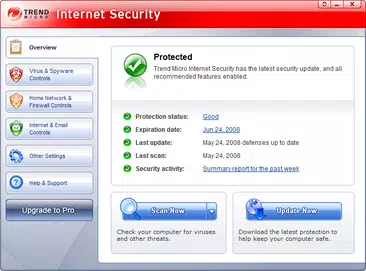
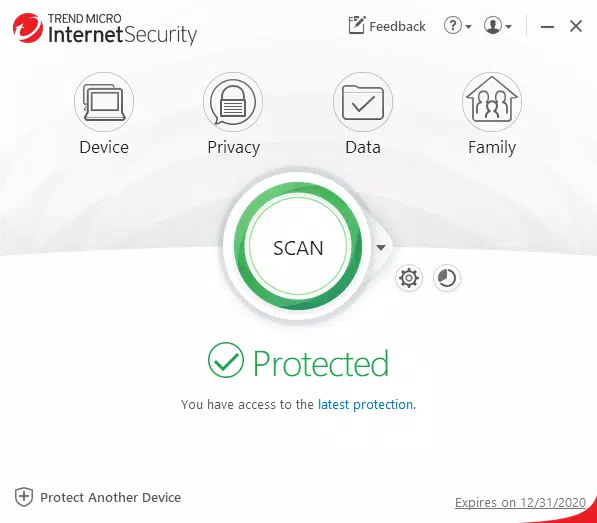
The user interface of Trend Micro Internet Security is designed with clarity and functionality in mind. The layout is intuitive, featuring a clean dashboard that displays real-time threat status, protection status, and recent security events. Navigation is straightforward, allowing users to access core features such as scan, protection settings, and threat history with minimal taps.
Visual style leans toward a professional, security-focused aesthetic—using muted tones and clear icons to convey trust and reliability. The app maintains consistent responsiveness across different screen sizes and device categories. Although the developer did not list formal performance metrics, the lightweight file size of 22.1 MB suggests optimized resource usage, which may contribute to efficient operation without draining battery or slowing down the device.
Stability appears to be well-maintained, as the app functions reliably during routine tasks like scanning, updating definitions, and monitoring web traffic. Users can expect smooth transitions between sections and prompt feedback when actions are initiated. The app does not display visible lag or crashes during standard use, indicating solid performance under normal conditions.
Platform Compatibility & Technical Requirements
Trend Micro Internet Security is available exclusively on the Android platform. It is compatible with devices running Android OS, though specific version requirements were not listed by the developer. The app has a file size of 22.1 MB, which is relatively small and suitable for devices with limited storage capacity.
The developer did not specify minimum OS requirements, nor did they provide details about device compatibility beyond the platform. This lack of information means users should verify compatibility with their specific device model and Android version before installation. While the app is free to download and install, users should ensure their device meets the underlying system requirements to avoid potential issues.
Pros and Cons
- Comprehensive protection against viruses, malware, ransomware, and phishing attacks
- Advanced threat detection powered by machine learning
- Supports cloud-synced folder protection across major platforms
- Lightweight file size (22.1 MB) for efficient storage use
- Free to download and use with no in-app purchases
- Specific OS version requirements were not disclosed
- No detailed information on data collection or privacy policies
- Feature set may be less visible to new users without onboarding guidance
- Performance metrics were not provided by the developer
- Limited customization options for advanced users
FAQ
Is Trend Micro Internet Security safe to install on my Android device?
Yes, the app is developed by Trend Micro, a trusted name in cybersecurity. It is available through official channels and does not contain known malicious components. Users should always download apps from verified sources to ensure safety.
Does the app require a subscription or payment to use?
No, Trend Micro Internet Security is free to download and use. There are no in-app purchases or subscription fees mentioned in the app’s current release.
Can I use this app on multiple devices?
The developer did not specify whether the app supports multi-device usage. While the app is available on Android, it is unclear if a single account can be used across multiple devices.
How often does the app update its threat database?
Although specific update intervals were not provided, the app leverages real-time threat intelligence and machine learning to ensure protection remains current against emerging threats.
Is the app compatible with all Android smartphones?
While the app is designed for Android, the developer did not list specific compatibility requirements. Users are advised to check their device’s OS version and storage capacity before installation.
Final Thoughts
Trend Micro Internet Security delivers a powerful, no-frills approach to mobile protection. With its focus on advanced threat detection, anti-ransomware safeguards, and cloud folder protection, it stands out as a reliable tool for users seeking comprehensive security without complexity. The free availability and lightweight design make it accessible to a wide audience, especially those who value privacy and safety during everyday digital activities.
While some technical details remain undisclosed, the app’s strong reputation and feature set justify its place in the mobile security landscape. It is ideal for individuals who want robust protection for personal files, online transactions, and cloud-based workflows. For those prioritizing safe browsing and device integrity, Trend Micro Internet Security offers a trustworthy solution.
Download Trend Micro Internet Security now


